

Table of Contents
1Password vs NordPass: 7 Powerful Reasons to Choose 1Password in 2026
Passwords are still the weakest link in most people’s digital lives, and with breaches making headlines on a near-monthly basis, picking the right password manager isn’t really optional anymore. In the ongoing 1Password vs NordPass debate — with Dashlane thrown in for good measure — 1Password consistently lands near the top, and this comparison breaks down exactly why, along with where the competition has actually caught up.
Key Features Comparison (1Password vs NordPass vs Dashlane)
Let’s start by comparing the essential features of 1Password, NordPass, and Dashlane:
| Feature | 1Password | NordPass | Dashlane |
|---|---|---|---|
| Encryption | AES 256-bit | XChaCha20 | AES 256-bit |
| Multi-factor authentication | ✓ | ✓ | ✓ |
| Password generator | ✓ | ✓ | ✓ |
| Secure password sharing | ✓ | ✓ | ✓ |
| Dark web monitoring | ✓ | ✓ | ✓ |
| Travel mode | ✓ | ✗ | ✗ |
| VPN | ✗ | ✗ | ✓ |
| Free plan | ✗ | ✓ | ✗ |
On paper, all three hold their own on core security. What really separates them is 1Password’s Travel Mode, which neither competitor has bothered to build. Worth flagging too: Dashlane quietly killed off its free plan in September 2025, which leaves NordPass as the only one of the three you can actually use for free long-term — a real factor if budget matters more to you than bells and whistles.
7 Reasons to Choose 1Password
1. Unparalleled Security
1Password locks everything down with AES 256-bit encryption — the same standard banks and governments lean on. On top of that, its Secret Key adds a second layer most competitors don’t bother with: a 128-bit random key that’s generated on your own device and never touches 1Password’s servers, so even if their systems were ever breached, your vault would still be out of reach.
2. User-Friendly Interface
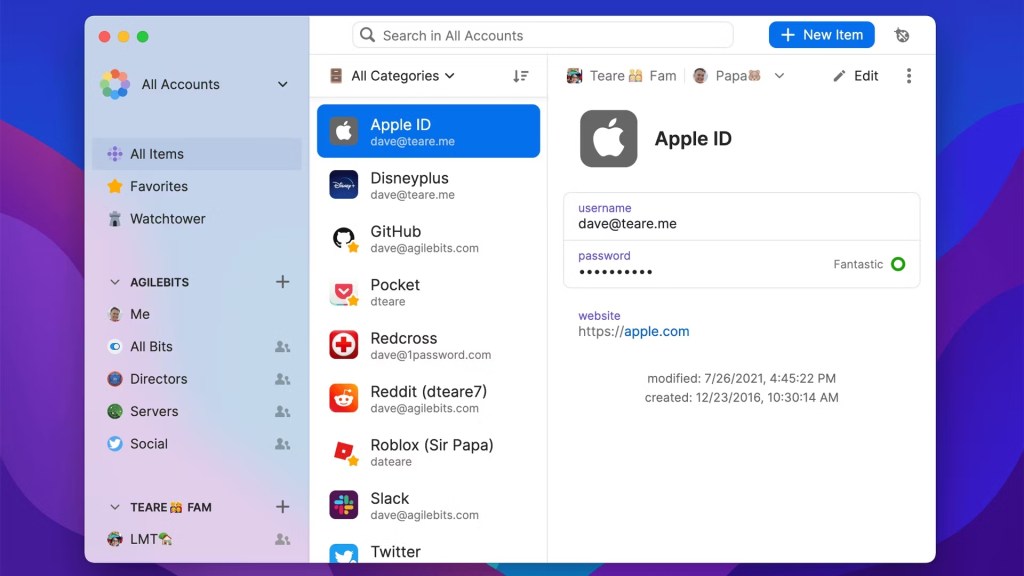
You don’t need to be a tech person to get comfortable with 1Password fast. The layout is clean enough that first-timers won’t feel lost, while the advanced controls power users actually want are never more than a click or two away.
3. Travel Mode
This is the feature that genuinely sets 1Password apart: flip on Travel Mode before a border crossing, and sensitive vaults temporarily disappear from your devices entirely. For business travelers, journalists, or anyone crossing into a country with aggressive digital-search laws, that’s not a nice-to-have — it’s the reason some people choose 1Password over everything else on this list.
4. Watchtower
Watchtower quietly runs in the background, flagging weak or reused passwords before they become a problem. It also keeps an eye on which of the software and websites in your vault have known vulnerabilities, so you get a running security checkup instead of finding out about a breach after the fact.
5. Seamless Cross-Platform Sync
Switch from your Mac to your phone to a work PC and 1Password just keeps up — no manual exports, no waiting for sync, no missing entries. Windows, macOS, iOS, Android, it doesn’t matter which combination you’re juggling.
6. Secure Document Storage
1Password isn’t just for passwords — it’s also a solid place to stash scanned passports, credit card details, and other sensitive documents you’d rather not leave sitting in your email or photo library. That’s especially handy when you’re traveling and need a backup copy of your ID without carrying the physical original everywhere.
7. Family and Business Plans
Sharing passwords with a partner or handling logins for a whole team is where 1Password’s group plans earn their keep. Up to five family members can share a vault securely, and business plans layer on activity logs and custom groups for teams that need more oversight.
1Password vs NordPass: A Deeper Dive
NordPass still offers a genuinely free plan, and 1Password got more expensive in 2026 — so the price gap between them is wider now than it used to be. Here’s how the current plans stack up:
| Plan | 1Password | NordPass |
|---|---|---|
| Personal | ~$3.99/month (billed annually) | ~$1.99–$2.99/month (varies by term length) |
| Family | ~$5.99/month (up to 5 users) | $4.99/month (up to 6 users) |
| Business | $8.99/user/month | ~$2.87–$4.31/user/month (tier-dependent) |
Prices are current list rates and shift often, so it’s worth double-checking each provider’s site before you subscribe. NordPass comes out cheaper than 1Password at every tier, and that gap only grew after 1Password’s March 2026 price increase. Even so, plenty of security-conscious users stick with 1Password anyway — the Secret Key architecture, Travel Mode, and a noticeably more polished interface are the kind of extras people are willing to pay a premium for. Whether that trade-off is worth it really comes down to how much you value those specifics over saving a few dollars a month.
1Password vs Dashlane: Feature Showdown
Dashlane is the other serious name in this space. Here’s how it actually compares to 1Password once you get past the marketing pages:
- Security: Both lean on AES 256-bit encryption, but 1Password’s Secret Key gives it a slight edge — it’s the kind of extra safeguard you hope you never need, but will be glad exists if a server ever gets compromised.
- VPN: Dashlane bundles in a VPN, something 1Password doesn’t offer at all. That said, if border crossings or travel privacy are your actual concern, 1Password’s Travel Mode solves a problem a generic VPN never will.
- User Interface: This one isn’t close — 1Password’s interface feels more thought-out, with a logical layout that makes day-to-day password management less of a chore.
- Business Features: Pricing between the two has actually converged — 1Password runs about $8.99 per user monthly against roughly $8 for Dashlane — so this one really comes down to whether your team needs 1Password’s custom groups and detailed activity logs, not which one costs less.
Why 1Password Stands Out
None of this matters much if people don’t actually enjoy using the product day to day — and that’s where 1Password separates itself. The chart below shows user satisfaction ratings across all three:• 1Password: 95%
• NordPass: 91%
• Dashlane: 85%That gap tracks with what you’d expect once you’ve used all three side by side — the extra polish in 1Password’s day-to-day experience adds up.

Additional Security Measures
1Password does more than just store passwords behind a lock. A few things it handles automatically in the background:• Flags reused passwords and nudges you to swap in something unique for each account
• Surfaces weak or duplicate logins before they turn into a real problem
• Gives business teams a real workflow for sharing credentials securely, not just a shared spreadsheet dressed up
• Lets teams organize shared vaults so access stays limited to who actually needs it
• Leaves security settings customizable, rather than locking everyone into one-size-fits-all defaults
Usability and Customer Support

Even someone who’s never touched a password manager before can get up and running with 1Password quickly — the design doesn’t sacrifice depth for simplicity, it just hides the complexity until you actually need it. And if something does go sideways, support is there around the clock via email and live chat, backed by a knowledge base and an active user community for the more advanced questions.
Conclusion
Weighing 1Password against NordPass and Dashlane, 1Password still comes out as the strongest overall package for anyone who values security depth and a polished experience — its Secret Key architecture and Travel Mode simply don’t have a real equivalent elsewhere. That said, 2026 brought some real shifts worth factoring in: 1Password’s March price increase makes NordPass the clearer budget pick at every tier, and Dashlane’s discontinued free plan means it’s now mainly worth a look for its business pricing and bundled VPN rather than as a value option for individuals. If price is your deciding factor, NordPass wins outright. If security depth and day-to-day polish matter more, 1Password is still the one to beat.
For anyone serious about locking down their digital life, 1Password offers one of the strongest balances of security, usability, and advanced features you’ll find. If that sounds like what you need, it’s worth setting up today rather than waiting for a breach to force the issue. With its deep feature set, strong security, and genuinely user-friendly interface, 1Password remains a smart choice for anyone looking to tighten up their online security in 2026 and beyond. If you have any questions, regarding 1Password vs NordPass you can reach us on Facebook as well. Enjoy!


